Write Continuous Queries
Write and debug Continuous Queries
less than a minute
The VS Code extension enables you to rapidly test the validity of your
continuous queries
Continuous Query
A query that runs continuously, maintaining an always-current result set as data changes.
Learn more
by providing a one click Run button that will
bootstrap
Bootstrap
The process of loading initial data when a Continuous Query starts.
Learn more
, execute and display the results/errors of queries within your VS Code workspace.
Installing
Download the VS Code extension from https://github.com/project-drasi/drasi-platform/releases/download/v0.1.0/drasi-0.0.3.vsix (Ensure that you are logged in to Github).
Open the VS Code command palette and run the Extensions: Install from VSIX command and select the drasi-0.0.3.vsix from your download location.
Usage
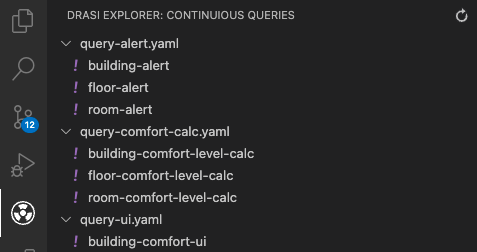
Once the extension is installed, the Drasi Explorer view should be visible in the Activity Bar. This will scan your workspace for YAML files that contain continuous queries and enable you to execute them once off against your Drasi instance. You will need to manually deploy any
source(s)
Source
A connection to an external system that Drasi monitors for data changes.
Learn more
that your queries depend upon.
Feedback
Was this page helpful?
Glad to hear it! Please tell us what you found helpful.
Sorry to hear that. Please tell us how we can improve.